We have a number of clients who have requested advice on how to make their Emails/Logins/Websites/Bank Accounts/Etc more secure and prevent any access due to fraudulent/criminal activities.
1. Passwords
The most common method of any illegal access to an account is by having an insecure password protecting your account. So what is an insecure password?
- Sequential/Keyboard Patterns: 123456, 111111, qwerty, asdfgh
- Simple Words: password, login, welcome, iloveyou
- Username/Service Based: admin, password, or variations of the service name (e.g. Target12345)
- Short/Simple Alphanumeric: 12345678, 1234567890
- Weak Combinations: Aa123456, p@ssw0rd
- Names/Pop Culture: superman, princess, dragon, harrypotter
Why these are insecure:
These passwords are at the top of hacker dictionaries and can be cracked in less than a second using automated, “brute-force” attacks. Using these makes accounts highly vulnerable to unauthorized access.
How to secure your Passwords
Since 2012 we have enforced secure passwords on all our Microsoft 365 Subscriptions & Emails. Since then neither our company nor our clients have had any instances of unauthorised access. This is our solution:-
Create a password at least 8 (12 is better) characters long with a lowercase characters, upper case characters, numbers and a symbol (most common are !@#$%^&).
As an example: PqqY76&k
2. Email Security
One of the common methods of installing malicious code/programs onto your desktop/laptop/tablet/phone allowing unauthorised access is for an email recipient to click on a link contained in an email.
The golden rule here is you get “Nothing for Nothing” Be cautious of unsolicited offers or free gifts—these are common phishing tactics.
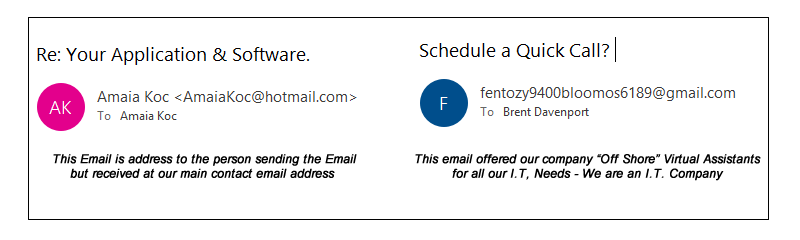
In both instances the email examples above were received from email addresses created free of charge from hotmail.com & gmail.com.
If you consider the low cost price or registering a domain, creating a website and a company email there is no reason whatsoever for a genuine company offering goods and services to use any form of free email addresses from hotmail, outlook, google, yahoo etc, so send this type of email to your junk folder and forget about it.
Further, never answer or reply to an email from such a source as this action will confirm to whoever is trying to contact you that they have reached a genuine email, which could result in further issues.
Website Security
When you visit an insecure website then you will see the following displayed:-
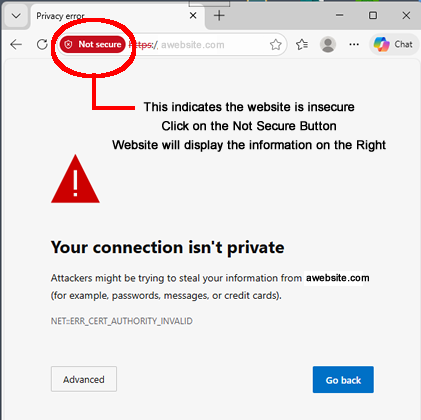
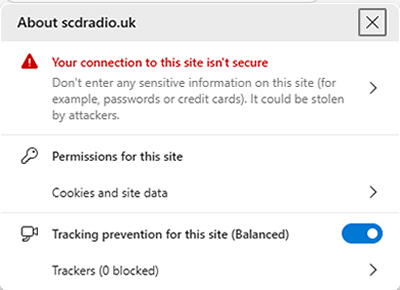
All web browsers now display these images when a website has not been secured with an SSL Certificate. You should avoid entering any personal information on such websites.
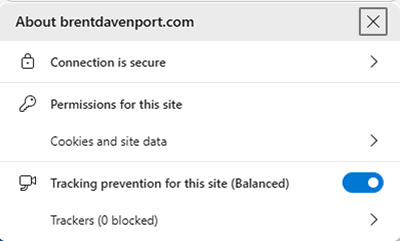
A genuine (secure) website will have a padlock symbol (this may vary from browser to browser but always top left before the website URL) also to indicate the website is safe the first part of the website address will always begin with HTTPS:// as underlined in the image below with the red line.
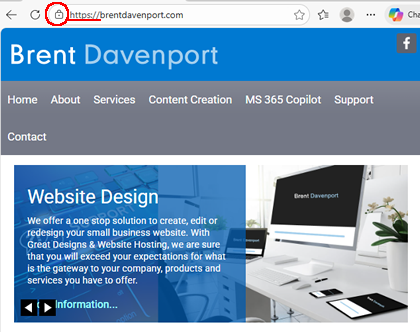
When you click on the padlock symbol you will be able to view the information below:-
Phones
Any form of cold call on your phone should always be suspected. You will never receive calls from your bank or credit card company and should you receive such a call immediately close the call down and call your bank/credit card company directly. Never allow anyone who you do not know to install any kind of software on any of your devices in particular Any Desk.
Finally
This subject of Cyber Security is large and complex, the advice detailed in this blog should help to keep you safe online. As a company there is much more you can do to improve the security of your devices and company network.
Take a look at the protection provided by Microsoft Defender For Business Security Microsoft, InTune, Microsoft Entra Business Security & Microsoft Purview Information Protection.